Avro Phonetic typing is
back on Mac.
The native Apple Silicon Bangla phonetic keyboard. iAvro-style typing on M-series Macs — no Rosetta required. Lekho is free, open source, forever.
Everything iAvro did — natively on Apple Silicon.
Full Avro Phonetic
The same transliteration you know — type
ami banglay gan gai
and get
আমি বাংলায় গান গাই. Conjuncts, reph, ya-phala — all handled.
150k Words + Emoji
Smart suggestions from a comprehensive Bangla dictionary with autocorrect. Plus contextual emoji — কান্না suggests 😢, বাংলাদেশ suggests 🇧🇩. The words you pick are remembered. Don't want emoji? One switch turns them off.
~2.2 MB. Zero Bloat.
Native Apple Silicon binary. No Electron, no Java, no background daemon. Instant startup, zero CPU when idle. A proper input method.
Your Way of Typing
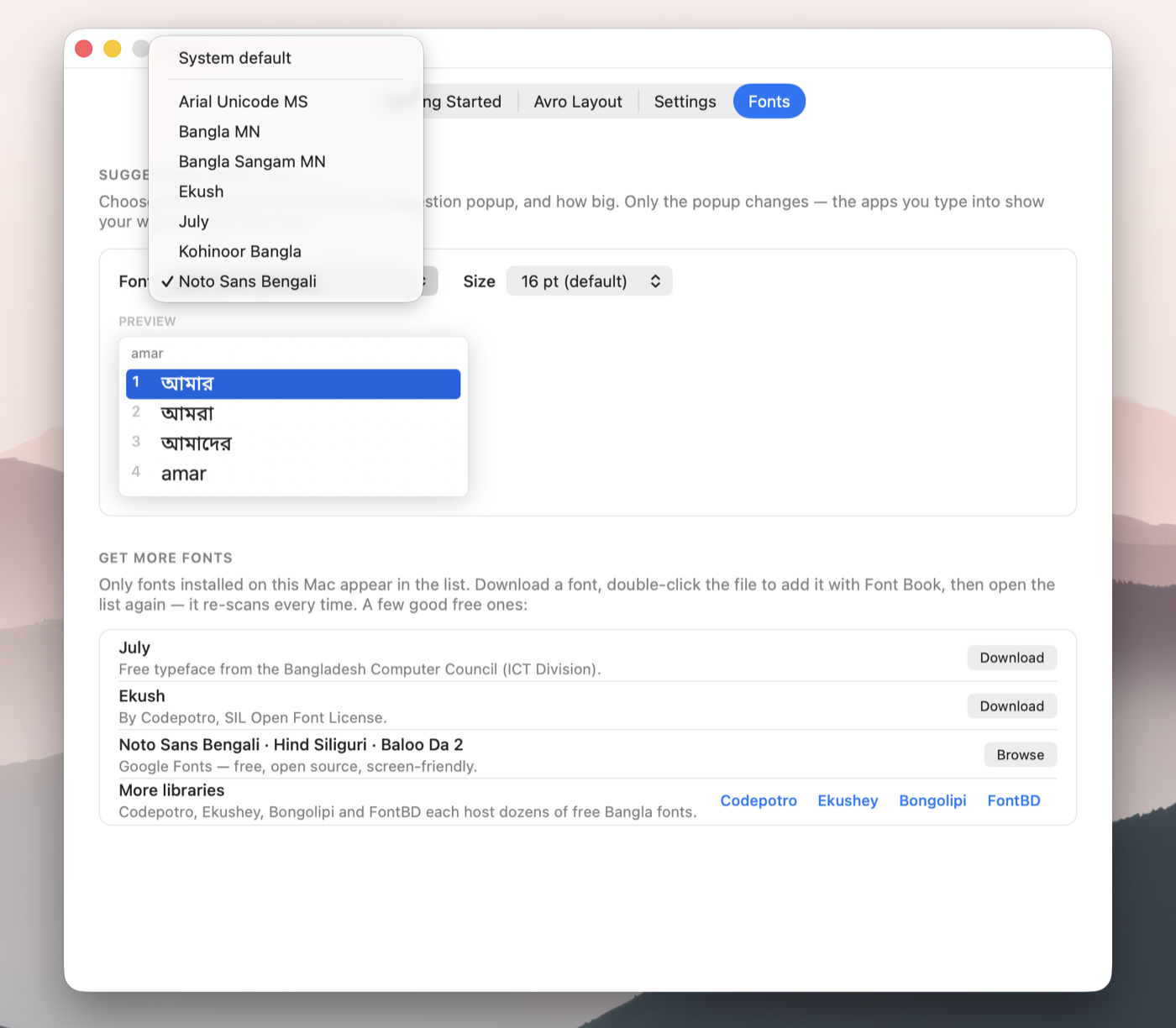
Phonetic-first types exactly what you spell with suggestions one key away. Smart lets the dictionary choose. Phonetic-only has no popup at all. Draw the popup in July, Ekush or any installed Bangla font, at the size you like.
No Data Collection
Everything runs locally on your Mac. No internet connection needed, no telemetry, no keystrokes ever leave your machine.
Powered by OpenBangla
Built on riti — the same proven engine behind OpenBangla Keyboard on Linux, now on macOS.
Up and running in 2 minutes.
Install
Have Homebrew? One command:
brew install --cask arahim3/lekho/lekho
Otherwise, grab the latest .dmg from
GitHub Releases, open it, and double-click
Install Lekho.pkg — the
installer handles everything.
-
macOS may block the installer because Lekho isn't signed
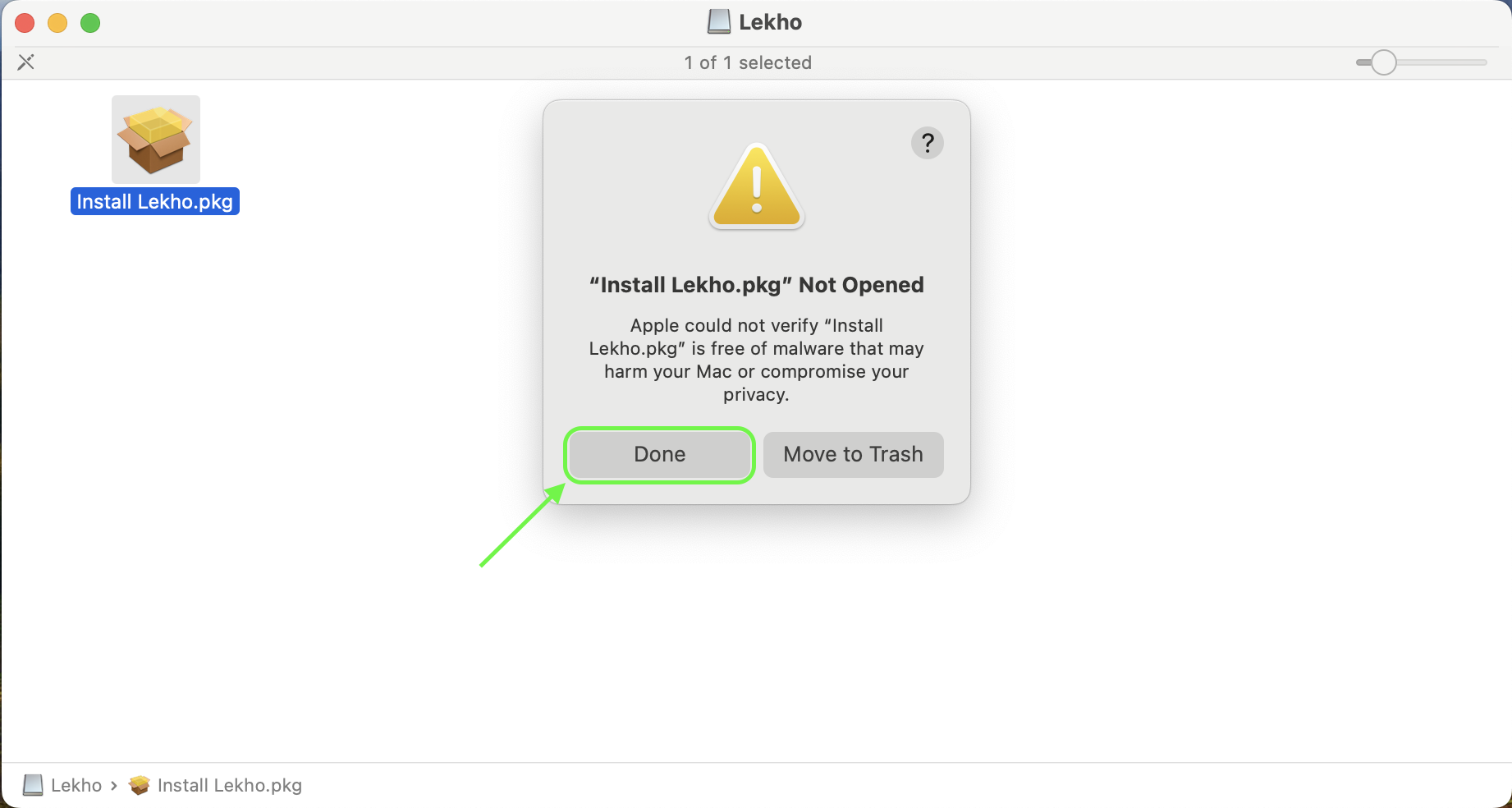
with an Apple Developer ID yet. If you see "Install Lekho.pkg" Not
Opened, click Done — not "Move to Trash".
The Open Anyway option only appears after you do.
-
Open System Settings → Privacy & Security, scroll to
the Security section, and click Open Anyway
next to "Install Lekho.pkg" was blocked. Then double-click the
.pkgagain and it installs normally.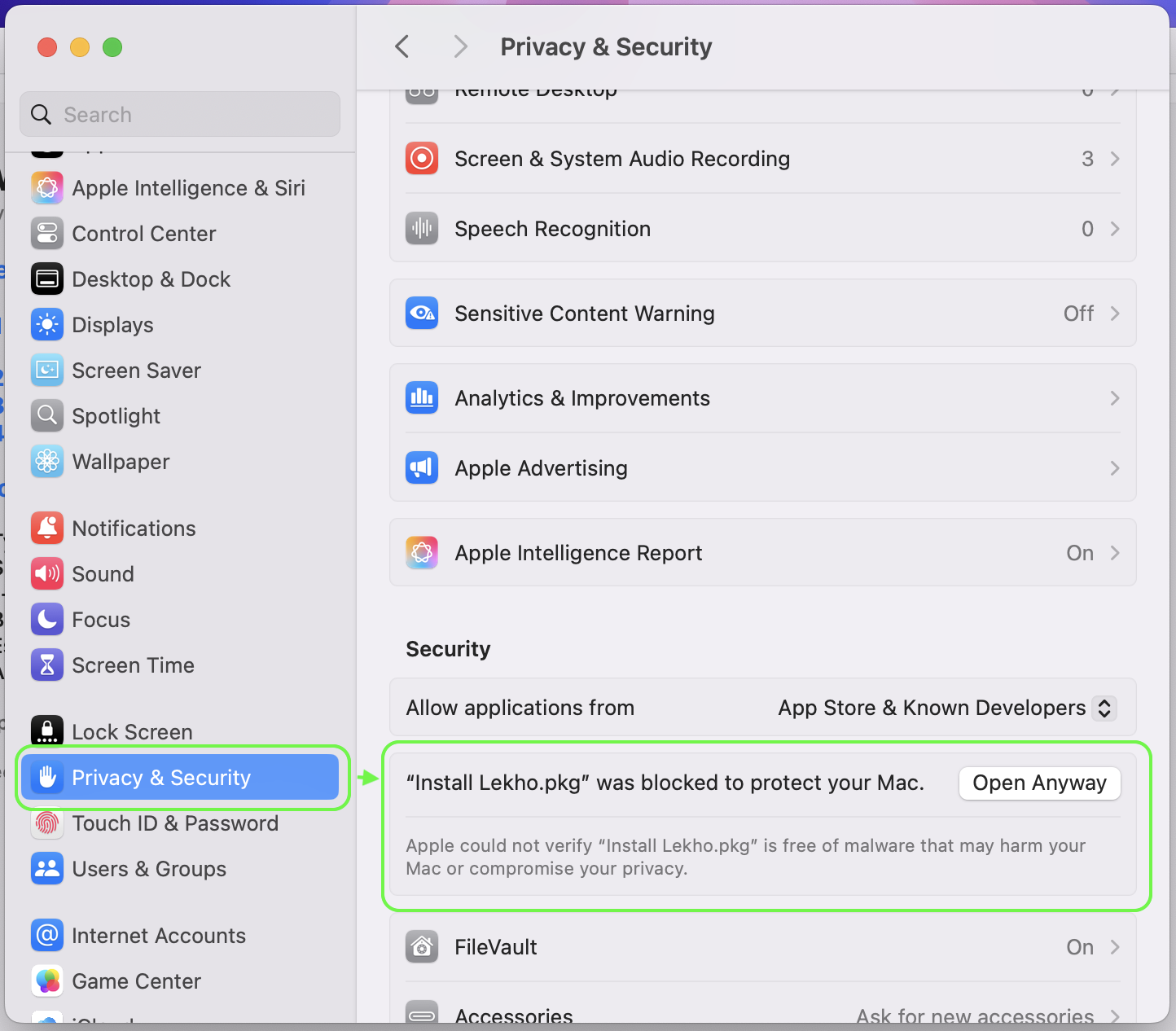
Add the input source
Open System Settings → Keyboard → Input Sources → Edit, click +, find English → Lekho, and add it. If Lekho doesn't appear in the list, log out and back in once — macOS sometimes needs this to discover new input methods.
Start typing বাংলা
Switch to Lekho from the menu bar or use your keyboard shortcut. Type in English, see Bengali.
Technical details
লেখো, on your Mac.
Download Lekho and help us test. Every bug report makes it better for everyone.
Common questions
Is this the same as Avro Keyboard for Mac?
Lekho is a spiritual successor — it uses the same Avro Phonetic transliteration rules made familiar by Avro Keyboard on Windows and iAvro on macOS. iAvro is an Intel-only build that still runs on Apple Silicon through Rosetta, though Apple has announced Rosetta support is being wound down. Lekho is built natively for Apple Silicon Macs (M1, M2, M3, M4, M5), so it stays first-class as macOS evolves.
Does it work on MacBook Air / MacBook Pro with M4 or M5?
Yes. Lekho runs natively on all Apple Silicon Macs — MacBook Air, MacBook Pro, iMac, Mac Mini, Mac Studio, and Mac Pro with any M-series chip (M1, M2, M3, M4, M5 and future chips).
How is this different from the macOS built-in Bengali keyboard?
The macOS built-in Bengali input uses Apple's own layout, not Avro Phonetic rules. If you're used to typing Bangla with Avro phonetics — like on Windows with Avro Keyboard, or on Linux with OpenBangla Keyboard — Lekho will feel familiar. Same transliteration style, plus a 150k-word dictionary with smart suggestions.
Is Lekho free? Is it open source?
Yes, completely free — no ads, no subscription, no sign-up. Lekho is open source under the MPL-2.0 license. The transliteration engine is OpenBangla's riti, the same proven engine behind OpenBangla Keyboard on Linux.
What is the best Avro keyboard for Mac in 2026?
For native Apple Silicon, Lekho is currently the only Avro Phonetic keyboard built specifically for the M-series. iAvro still runs via Rosetta, but Apple has announced Rosetta support is being wound down — fully available in macOS 27, then limited to legacy games starting in macOS 28. Lekho is free, open source, and runs natively on M1–M5 Macs.
Is there an iAvro alternative for Apple Silicon Mac?
Yes — Lekho is a modern replacement for iAvro. It's built natively for Apple Silicon, uses the same Avro Phonetic transliteration rules, and includes a 150,000-word Bengali dictionary with smart suggestions. It works in every app including Chrome, Safari, Notes, Mail, and more.
How do I type Bangla on a Mac?
Install Lekho, then go to System Settings → Keyboard → Input Sources → click + → search "Lekho" → Add. Switch to it with the Globe key or Ctrl+Space. Then just type in English and it converts to Bengali phonetically — for example, type "ami" to get "আমি".
Can I install Lekho with Homebrew?
Yes. Run brew install --cask arahim3/lekho/lekho and you're done.
Update with brew upgrade --cask lekho, remove with
brew uninstall --cask lekho. Prefer not to use Homebrew? The DMG from
GitHub Releases works just as well.
Can I turn off emoji or the suggestion popup?
Yes. Open the Lekho app and go to Settings. Turn off Show emoji in suggestions to keep the suggestion popup without emoji, or pick Phonetic-only for no popup at all. Phonetic-first types exactly what you spell and keeps the suggestions right below it.
The installer says "Install Lekho.pkg" Not Opened. What now?
That's macOS Gatekeeper, because Lekho isn't signed with an Apple Developer ID yet
(that costs $99/year; the code is open source if you want to check it). Click
Done on the dialog — not "Move to Trash" — then open
System Settings → Privacy & Security, scroll to the Security
section, and click Open Anyway next to the Lekho message. Run the
.pkg again and it installs. You only do this once per download. Homebrew
users skip it entirely.
Can I change the font of the suggestion popup?
Yes. Open the Lekho app and go to the Fonts tab. It lists every Bangla-capable font installed on your Mac — July, Ekush, Noto Sans Bengali, Kohinoor Bangla — and lets you pick the size, with a live preview. Only the popup changes; the apps you type into still show your words in their own font. The tab also links to free fonts you can install.